React-Navtive Restate
Personal Project
Individual Contributor
React-Native

A full-stack Real Estate app from scratch with Google Authentication, dynamic routing, and more. Using the React Native framework Expo,
Key Features
Authentication with Google
• Secure and seamless user sign-ins using Google’s authentication service.
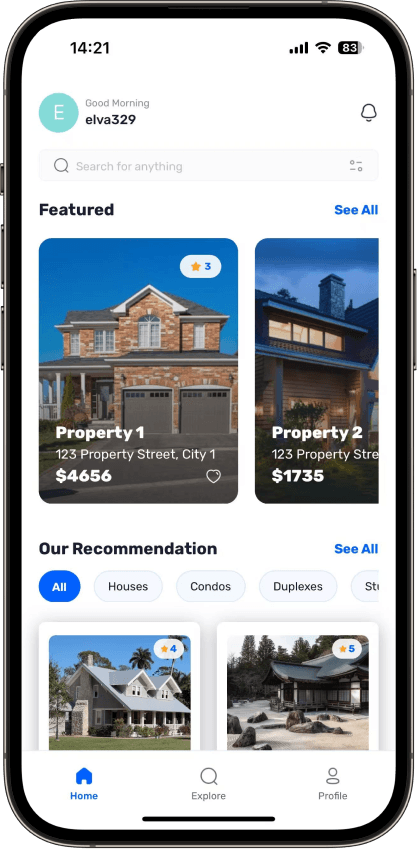
Home Page
• Displays the latest and recommended properties with powerful search and filter functionality.
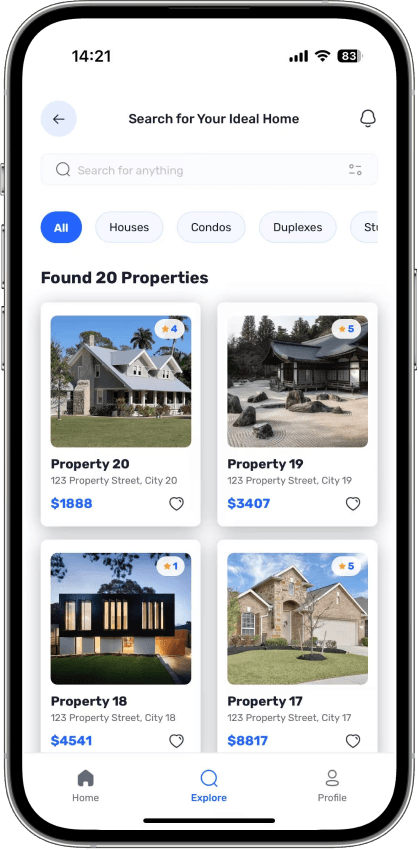
Explore Page
• Allows users to browse all types of properties with a clean and intuitive interface.
Property Details Page
• Provides comprehensive information about individual properties, including images and key details.
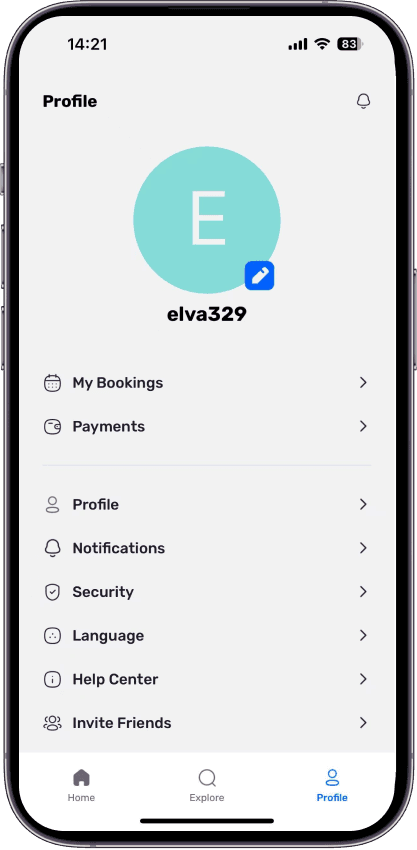
Profile Page
• Customizable user settings and profile management.
Centralized Data Fetching
• Custom-built solution inspired by TanStack’s useQuery for efficient API calls.
Technology Stack
| Layer | Technologies |
|---|---|
| Frontend | Expo, React Native, TypeScript, Nativewind, Tailwind CSS |
| Backend | Appwrite |
| Deployment | No deployment need, accesiable through phone directly |
Development Process
Project Setup
• Initialized the React Native project using Expo for a streamlined setup process. Installed essential dependencies such as React Navigation, Redux Toolkit, and React Native Paper.
• Configured navigation using React Navigation. Created a stack navigator to handle transitions between screens, such as the Home screen and Profile screen.
Setup Nativewind, Fonts and Assets
• Integrated Nativewind for utility-first styling, enabling faster and more consistent UI development with Tailwind-like syntax.
• Added custom fonts and assets to the project. Configured the app to load fonts correctly using Expo’s font-loading utilities.
Setup Appwrite & Integrate Google oAuth
• Integrated Appwrite as the backend service and configured Google oAuth for seamless user authentication.
• Set up the Appwrite SDK and created utility functions for handling authentication, such as login, logout, and user registration.
• Connected the Sign In screen to the authentication functions, enabling users to log in and access the app’s features.
Implement Tabs Navigation, Home screen UI & Profile Screen
• Added a bottom tab navigator to switch between key screens like Home, Explore, and Profile.
• Designed the Home screen layout, including a header, search bar, and sections for displaying tasks or properties.
• Implemented lists on the Home screen to display tasks or properties dynamically. Added functionality to add, edit, and delete items.
• Developed the Profile screen to display user information and provide options for logging out or editing profile details.
Appwrite DB Setup, Data fetch and Display
• Configured the Appwrite database to store and manage app data, such as tasks or property listings.
• Seeded the database with initial data for testing and development purposes.
• Created functions to fetch property data from the Appwrite database and display it on the Home screen.
• Implemented logic to render fetched data in lists or grids, ensuring a smooth and responsive user experience.
Explore Screen & Details Screen
• Developed the Explore screen to allow users to browse additional content or listings, with filters and search functionality.
• Created a Details screen to show comprehensive information about a selected task or property, including images, descriptions, and actions.
TABLE OF CONTENTS
- Overview
- Key Features
- Authentication with Google
- Home Page
- Explore Page
- Property Details Page
- Profile Page
- Centralized Data Fetching
- Technology Stack
- Frontend
- Backend
- Deployment
- Development Process
