Avoid the Iceberg
Personal Project
Individual Contributor
VR


This project is a web-based virtual reality (VR) game where users navigate an icy ocean environment, moving left and right to avoid incoming icebergs. The game provides an immersive experience through the integration of VR technologies, allowing users to play directly in the browser without additional software installations.
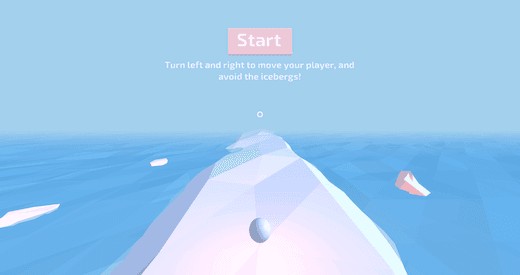

Key Features
Immersive VR Gameplay
• Users interact with the environment in a fully immersive 3D space, controlling movement via VR hardware or traditional input methods (keyboard/mouse).
Dynamic Obstacles
• Icebergs appear randomly, and players must react quickly to avoid collision, making for a challenging and fast-paced experience.
Web-based Access
• The game runs directly in a web browser, powered by WebVR, making it accessible on various devices.
Responsive Design
• The game adapts to different screen sizes and is compatible with VR headsets, offering flexibility for both VR and non-VR users.
Technology Stack
| Layer | Technologies |
|---|---|
| Frontend | A-Frame, Ocean.js, Ergo.js, JavaScript, HTML, CSS |
| Backend | No backend |
| Deployment | No deployment need, accesiable through web page directly |
Challenges
 Performance Optimization
Ensuring smooth gameplay across devices with varying hardware capabilities was a key challenge. The game's 3D rendering had to be optimized to maintain high frame rates, particularly for VR users with less powerful hardware. The integration of A-Frame's low-poly rendering style helped significantly improve performance.
Complexity of WebVR Integration Setting up a seamless WebVR experience that works across different devices and browsers posed a challenge. Configuring the game to function smoothly both on VR headsets and regular devices required careful attention to input handling and performance optimizations.
Dynamic Obstacle Generation Creating dynamic, randomly appearing icebergs that challenge the player’s reflexes and movement involved fine-tuning the randomization and ensuring a smooth, bug-free interaction.
Achievements
Successfully created an engaging VR experience that runs smoothly in the browser, without the need for additional software or plugins.Implemented smooth and responsive movement controls using custom scripts (Ocean.js and Ergo.js), improving user engagement and playability.
TABLE OF CONTENTS
- Overview
- Key Features
- Immersive VR Gameplay
- Dynamic Obstacles
- Web-based Access
- Responsive Design
- Technology Stack
- Frontend
- Backend
- Deployment
- Challenges
- Performance Optimization
- Complexity of WebVR Integration
- Dynamic Obstacle Generation
- Achievements
